TL;DR
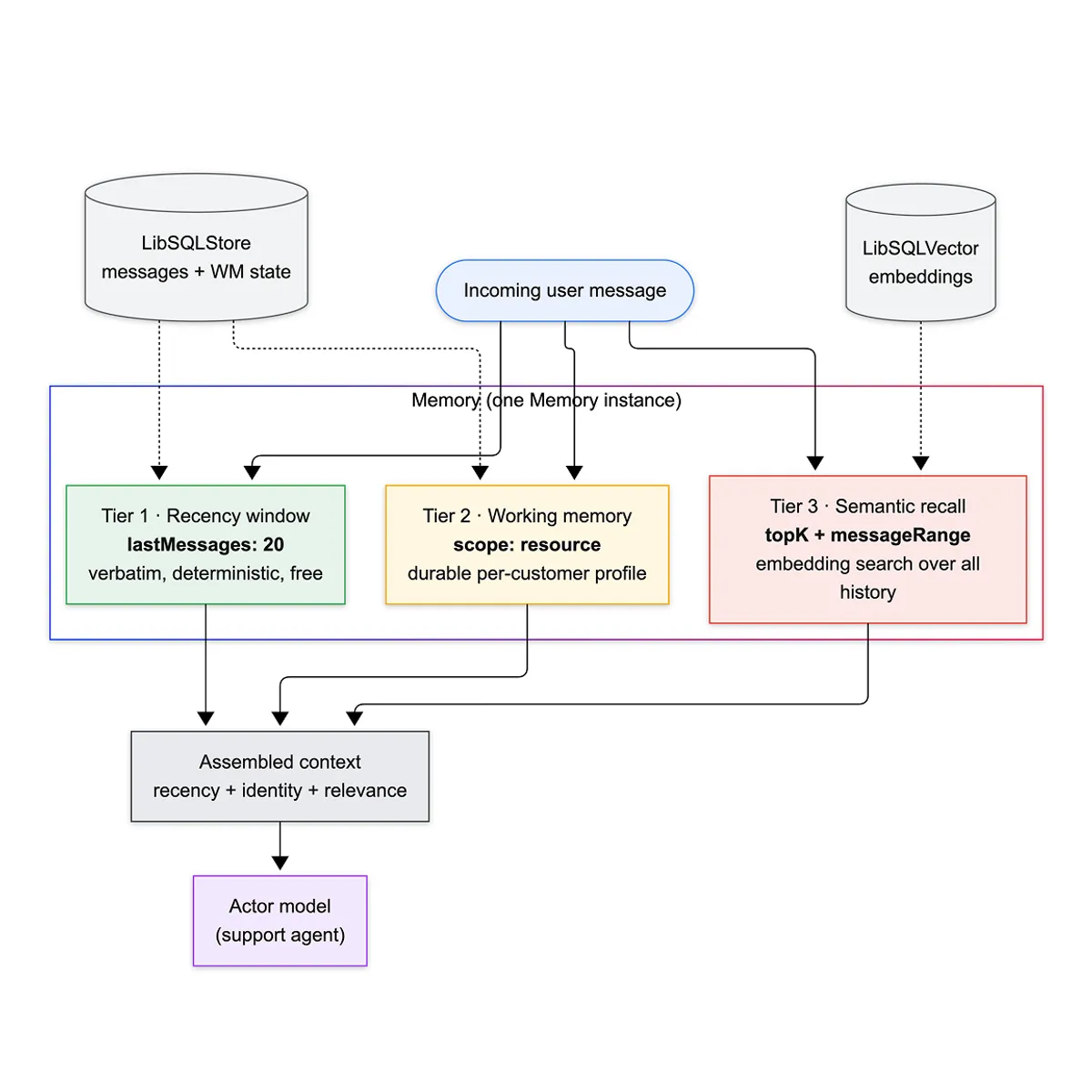
lastMessages: 20is where everyone starts and it leaks fast: the customer told you their account tier on turn 3, and by turn 40 the model is asking again — or worse, guessing.- Mastra stacks three recall tiers: a recency window (verbatim last N), working memory (a durable per-customer profile the agent rewrites), and semantic recall (embedding search over all past messages).
- The move that makes it work:
scope: 'resource'— one profile and one searchable history per customer, not per chat, so memory survives across conversations. - For long threads, Observational Memory runs a three-agent loop (Actor / Observer / Reflector) that compresses history in the background, keeping context flat while conversations run past 200 turns.
- Part 3 of a series on harness engineering with Mastra. It builds directly on Part 2 — Processors and Guardrails, because in Mastra memory is processors.
Why lastMessages isn’t enough
The default memory setup from every tutorial:
- Attach a
Memoryinstance with a storage adapter. - Set
lastMessagesto some number. - Ship it.
Right starting point. It buys you a coherent short exchange, and for a stateless one-shot agent it’s genuinely all you need.
Then a real conversation happens. A support customer opens with “I’m on the enterprise plan, my Stripe webhook stopped firing.” Twenty messages of troubleshooting later — logs, config, a tool call to check order status — that opening context has slid out of the window. The model no longer knows they’re enterprise. It re-asks. The customer, who already told you, gets that specific flavor of angry that comes from repeating yourself to a machine.
Bumping lastMessages to 100 doesn’t fix it. It moves the cliff and multiplies your token bill on every request — you’re now paying to re-send 100 messages each turn to avoid forgetting one fact from turn 3. And it still resets to zero the moment the customer opens a new chat tomorrow.
The window is a recency cache, nothing more. Durable memory isn’t a bigger window — it’s a different mechanism that outlives the window entirely.
The three recall tiers
Mastra doesn’t make you choose. One Memory instance composes three independent recall mechanisms, and you configure each one where it earns its cost.
// src/mastra/memory/support-memory.ts — shape onlyexport const supportMemory = new Memory({ storage: new LibSQLStore({ ... }), // messages + working-memory state vector: new LibSQLVector({ ... }), // embeddings, for semantic recall embedder: 'openai/text-embedding-3-small', options: { lastMessages: 20, // tier 1: recency window workingMemory: { enabled: true }, // tier 2: durable profile semanticRecall: { topK: 3 }, // tier 3: search over all history },});Read it as a cost gradient. lastMessages is free — it’s already in storage, deterministic, always present. Working memory is cheap — a small document the model rewrites via a tool call, re-read into context each turn. Semantic recall is the expensive tier — it embeds every message and runs a vector search, so it needs a vector store and an embedder before it does anything.
The non-obvious consequence: these are not fallbacks for each other, they compose. On a single turn the model can see the last 20 messages and the customer’s pinned profile and three semantically-matched lines from a conversation three weeks ago. Recency, identity, and relevance — three different questions, three different mechanisms, one context.
Working memory: the profile that outlives the window
Working memory is a living document scoped to a user. The agent reads it every turn and updates it — via a tool call — whenever it learns something durable. It’s the fix for “the customer told us on turn 3.”
import { Memory } from '@mastra/memory';import { LibSQLStore } from '@mastra/libsql';
// Re-read into context on EVERY turn, so a bloated template is a permanent// per-request tax. Headers only — no prose, no filler fields.const SUPPORT_PROFILE_TEMPLATE = `# Customer Profile
## Identity- Name:- Account tier: (free / pro / enterprise)- Primary contact email:
## Context- Product area they use most:- Known integrations:- Timezone / working hours:
## Open Threads- Current issue:- Order / ticket refs:- Promised follow-ups: (only what WE actually owe them — never invent)
## Preferences- Tone: (terse / friendly / formal)- Already told us: (don't ask twice)`;
export const supportMemory = new Memory({ storage: new LibSQLStore({ id: 'support-storage', url: 'file:./mastra.db' }), options: { lastMessages: 20, workingMemory: { enabled: true, scope: 'resource', template: SUPPORT_PROFILE_TEMPLATE, }, generateTitle: true, },});Three decisions worth pulling out.
scope: 'resource' is the whole point. A resource is the customer; a thread is one conversation. Resource-scoped working memory means the profile the agent built during Monday’s chat is right there in Wednesday’s. Thread-scoped — the isolation default for most stores — resets it every conversation, which quietly defeats the reason you added durable memory at all. If your users are anonymous kiosk sessions, thread is correct. If they have accounts, it’s almost always resource.
The template is a schema, not a scratchpad. Every header is a slot re-sent to the model each turn. Fields you don’t need are tokens you pay for forever and noise the model has to ignore. I keep it to identity, open threads, and preferences — the things that change the next reply. No “favorite color” unless favorite color changes the reply. (Prefer strict fields? Swap template for a Zod schema and the agent fills a typed object instead of a markdown doc.)
Working memory needs no embedder. It’s a document read from storage and prepended — no vectors involved. You get durable, cross-conversation memory with zero extra infrastructure and zero embedding cost. That’s why it’s the tier I reach for first, before spending a cent on semantic recall.
The pattern: working memory is for facts the agent should never have to ask twice — pin them to the customer, not the chat.
Semantic recall: search, not scroll
Working memory holds what the agent chose to write down. Semantic recall reaches the rest — the offhand line from six weeks ago that suddenly matters because the customer asked a related question today. It embeds the incoming message, runs a similarity search across all stored messages, and pulls the closest matches back into context regardless of how far back they are.
// src/mastra/memory/support-memory.ts (semantic-recall tier)import { Memory } from '@mastra/memory';import { LibSQLStore, LibSQLVector } from '@mastra/libsql';
// Semantic recall is the only tier that costs money to run (it embeds every// message). Gate the vector store on the key so `mastra dev` runs with zero setup// and recall lights up the moment an OPENAI_API_KEY is present.const EMBEDDER = process.env.OPENAI_API_KEY ? 'openai/text-embedding-3-small' : undefined;
export const supportMemory = new Memory({ storage: new LibSQLStore({ id: 'support-storage', url: 'file:./mastra.db' }), ...(EMBEDDER ? { vector: new LibSQLVector({ id: 'support-vector', url: 'file:./mastra.db' }), embedder: EMBEDDER, } : {}), options: { lastMessages: 20, ...(EMBEDDER ? { semanticRecall: { topK: 3, messageRange: { before: 2, after: 1 }, scope: 'resource', }, } : {}), },});Three decisions worth pulling out.
topK: 3, not 10. Every recalled message is tokens injected into the prompt, and the top match is almost always the useful one. topK: 3 catches the near-misses; higher just pads context with weaker hits that dilute the model’s attention and inflate the bill. Start at 3 and only raise it if you can point at a recall you actually missed.
messageRange is what makes a hit legible. A vector match returns one message — usually an answer with no question attached, or vice versa. { before: 2, after: 1 } re-attaches the two turns before and the one after each hit, so the model sees the exchange instead of an orphaned sentence. Drop this and recall technically works while feeling subtly broken — the model keeps surfacing context-free fragments.
scope: 'resource' again, and it’s load-bearing. Resource scope searches across every thread the customer ever opened; thread scope searches only the current one. For support that means “have they hit this before, in any conversation?” — which is the entire value of search over history. Thread-scoped semantic recall is just a fancier recency window.
One honest caveat: I gate the whole tier behind an API key. Working memory and recency need no embedder; semantic recall embeds every message you store, which is real latency and real cost. Turn it on when “search my past conversations” is a job your users actually have — not by default.
The pattern: recency is scroll, semantic recall is search — reach for it only when the history is too big to scroll and too valuable to forget.
The load-bearing insight: memory is processors
Here’s the thing the docs bury, and the reason this is Part 3 and not a standalone piece. When you configure memory, Mastra doesn’t run some separate subsystem. It injects processors into the exact same pipeline the guardrails from Part 2 run in. MessageHistory, SemanticRecall, WorkingMemory — each is a Processor, auto-added to your input and output arrays.
Which means ordering is real, and it’s designed to be safe by default:
Input: [Memory processors] → [Your inputProcessors]Output: [Your outputProcessors] → [Memory processors]On input, memory loads first — history, working memory, and recalled messages are in context before your guardrails inspect anything. On output, your guardrails run first, and memory persists last.
That output ordering is the gotcha, and it’s a feature. If your output guardrail calls abort() — say the unauthorized-promise guardrail from Part 2 catches the model promising a refund — the memory processors never run, and the bad message is never saved. Your history stays clean of content a guardrail already rejected. Get this backwards in a hand-rolled system and you persist the exact messages you blocked, then feed them back into the next turn.
You can also take the wheel. Add a memory processor to inputProcessors yourself and Mastra won’t auto-add its twin — you own the ordering:
// Manual control: your MessageHistory runs where you put it, then a token cap after.import { MessageHistory, TokenLimiter } from '@mastra/core/processors';
inputProcessors: [ new MessageHistory({ storage, lastMessages: 20 }), new TokenLimiter({ limit: 4000 }), // hard ceiling on what history can cost per turn],TokenLimiter is the unglamorous line that saves you: recall and working memory can balloon the prompt, and a token cap is the difference between a predictable bill and a surprise one. The pattern: memory and guardrails share one pipeline — order them cheap-and-loading-first on input, safety-first-and-persist-last on output.
Observational Memory: the three-agent loop for the long haul
Everything so far assumes the conversation eventually ends. Some don’t — a long support case, an agent that runs for hours, a thread that crosses hundreds of turns. There, even resource-scoped recall has a problem: the raw history is too big to send and too connected to summarize with a dumb truncation. lastMessages: 20 on a 200-message thread throws away 90% of the story.
Observational Memory (OM) is Mastra’s answer, and it’s a genuinely different architecture — three agents instead of one:
- Actor — your support agent. It never sees raw history past a small recent window. It sees observations.
- Observer — fires when unobserved messages cross a token threshold. It compresses them into structured observations. Runs in the background.
- Reflector — fires when the observations themselves grow too big. It condenses them, so the compressed layer can’t quietly balloon into the same problem it was solving.
import { ObservationalMemory } from '@mastra/memory/processors';import { LibSQLStore } from '@mastra/libsql';
// OM persists into the memory DOMAIN, not the whole store — hand it the domain.const store = new LibSQLStore({ id: 'support-om-storage', url: 'file:./mastra.db' });const memoryStorage = store.stores?.memory;if (!memoryStorage) { throw new Error('LibSQLStore did not expose a memory storage domain for OM');}
// Observer + Reflector do mechanical compression, not reasoning. Route them to a// small fast model in production and keep your expensive model on the Actor. A// shared model here just keeps the demo self-contained.const OM_MODEL = 'openrouter/nvidia/nemotron-3-super-120b-a12b:free';
export const supportObservationalMemory = new ObservationalMemory({ storage: memoryStorage, model: OM_MODEL, scope: 'resource', observation: { // Compress once ~12k tokens of un-observed chat pile up. Below the 30k default // because support turns are short — keep the summary fresh, don't wait on a // novel's worth of backlog. messageTokens: 12_000, }, reflection: { // Condense the observations once they cross 20k tokens. observationTokens: 20_000, },});And it wires in like any other processor — the same instance on both arrays:
// src/mastra/agents/support-agent.ts (OM variant)inputProcessors: [supportObservationalMemory, ...guardrails], // injects observationsoutputProcessors: [...guardrails, supportObservationalMemory], // tracks new messages, fires Observer/ReflectorFour decisions worth pulling out.
OM replaces history, it doesn’t stack on it. On input it injects observations plus a small recent-message tail; on output it decides whether to observe. Run a MessageHistory processor alongside it and you double up — raw history and observations of that same history in one prompt. Pick one.
The thresholds are token counts, and they’re two-stage on purpose. observation.messageTokens gates the Observer; reflection.observationTokens gates the Reflector. Two thresholds because two things grow: raw messages accumulate faster than observations, and each needs its own valve. I set both below the defaults (30k / 40k) because support turns are short and I’d rather the compressed view stay current than let a huge backlog build before anything fires.
Compression happens in the background. OM buffers observations asynchronously as tokens accumulate (every ~20% of the threshold by default) and activates the buffered result the instant the threshold trips — no blocking LLM call on the hot path in the common case. A synchronous fallback only kicks in if the conversation blows past the threshold faster than buffering keeps up. That’s the design that makes a three-agent system viable on a latency-sensitive path.
The Observer model is a cost lever, not a quality one. Its job is compression, not reasoning — so a small, fast model does it well and cheap. Putting your flagship model on the Observer is paying reasoning prices for a summarization task that runs constantly. Route it down.
The pattern: when history outgrows the window, don’t truncate it — compress it in the background and let the Actor read the summary.
Performance
Memory adds tokens and calls to every turn. How to keep it lean:
Trick 1: right-size the recency window. lastMessages is sent verbatim every request. 20 is plenty for a coherent exchange; 100 quadruples the per-turn token cost to guard against a forgetting that working memory already solves for free. Lower the window, lean on the durable tiers.
Trick 2: keep the working-memory template tight. It’s re-read every turn. Every field is a permanent tax. Cut anything that doesn’t change the next reply.
Trick 3: cap history with TokenLimiter. new TokenLimiter({ limit: 4000 }) in your input processors turns an unbounded prompt into a predictable one. Recall + working memory + history can spike; a ceiling is cheap insurance.
Trick 4: gate semantic recall behind real need. It embeds every stored message — latency and cost on writes, not just reads. If your conversations fit in the window plus a profile, you don’t need it. Turn it on when “search my past” is an actual user job.
Trick 5: for OM, route the Observer/Reflector down. Two background models on a small tier cost a fraction of your Actor model and do the mechanical work fine.
Below ~50-turn conversations, standard memory wins on simplicity — OM’s two extra models aren’t worth it until history genuinely outgrows the window.
What memory is not for
Right tool for durable, conversational context. Wrong tool for:
A knowledge base. Product docs, policies, past tickets across all customers — that’s RAG over a curated corpus, not agent memory. Memory recalls this user’s conversation; RAG retrieves shared reference material. Stuffing your docs into working memory bloats every prompt and still can’t answer “what does our refund policy say.” Different retrieval, different store.
Application state. Order status, subscription tier as source of truth, inventory — that lives in your database and gets read through a tool call, fresh, every time. Working memory is the agent’s notes on the customer, not the system of record. Mirror the account tier into working memory so the agent doesn’t re-ask; never trust it over the DB for a decision that touches money.
Audit logs. Memory is optimized for recall relevance — it compresses, it drops, it summarizes. If you need an immutable record of exactly what was said for compliance, write it to append-only storage yourself. Never make OM’s compressed observations your legal record; the Reflector’s whole job is to throw detail away.
The line: memory is what the agent remembers about the person it’s talking to — not what your company knows, and not what your database stores.
The full production stack
The support agent, memory wired end to end:
import { Memory } from '@mastra/memory';import { LibSQLStore, LibSQLVector } from '@mastra/libsql';
const EMBEDDER = process.env.OPENAI_API_KEY ? 'openai/text-embedding-3-small' : undefined;
const SUPPORT_PROFILE_TEMPLATE = `# Customer Profile## Identity- Name:- Account tier: (free / pro / enterprise)- Primary contact email:## Open Threads- Current issue:- Order / ticket refs:- Promised follow-ups: (only what WE actually owe them — never invent)## Preferences- Tone: (terse / friendly / formal)- Already told us: (don't ask twice)`;
export const supportMemory = new Memory({ storage: new LibSQLStore({ id: 'support-storage', url: 'file:./mastra.db' }), ...(EMBEDDER ? { vector: new LibSQLVector({ id: 'support-vector', url: 'file:./mastra.db' }), embedder: EMBEDDER, } : {}), options: { lastMessages: 20, // tier 1: recency workingMemory: { // tier 2: durable profile enabled: true, scope: 'resource', template: SUPPORT_PROFILE_TEMPLATE, }, ...(EMBEDDER ? { semanticRecall: { // tier 3: search over history topK: 3, messageRange: { before: 2, after: 1 }, scope: 'resource', }, } : {}), generateTitle: true, // scannable support inbox },});import { Agent } from '@mastra/core/agent';import { supportMemory } from '../memory/support-memory';
export const supportAgent = new Agent({ id: 'support-agent', name: 'Support Agent', instructions: `...`, // "refer to working memory before asking again" model: 'groq/openai/gpt-oss-120b', tools: { escalateToHuman }, memory: supportMemory, // three tiers, injected as processors into the pipeline outputProcessors: [ /* guardrails run FIRST, memory persists LAST — abort ⇒ nothing saved */ ], maxProcessorRetries: 3, defaultOptions: { maxSteps: 10 },});Three recall tiers behind one memory: line, zero required API keys for the durable ones, and a drop-in ObservationalMemory swap when threads run long. The agent stops re-asking, remembers customers across conversations, and — because memory rides the same processor pipeline as the guardrails — never persists a message a guardrail already killed.
The mental model: memory is a cache hierarchy for the conversation. lastMessages is L1 — tiny, hot, always there. Working memory is the profile you keep pinned. Semantic recall is disk you page in on demand. Observational Memory is the compressor that runs when the working set outgrows RAM. Same discipline as a CPU cache: keep the hot stuff close, page the rest, and never hold more than the level below can afford.
Frequently Asked Questions
What’s the difference between working memory and semantic recall?
Working memory is a small document the agent deliberately maintains — it decides what to write down (name, tier, open issues) and rewrites it via a tool call. Semantic recall is automatic retrieval — it embeds every message and pulls the closest matches on each turn, with no decision from the model. Working memory answers “what should I never forget about this person”; semantic recall answers “have we discussed anything like this before.” Use working memory for identity and state, semantic recall for reaching deep into history.
Do I need a vector store for memory to work?
No. Recency (lastMessages) and working memory need only a storage adapter — no vectors, no embedder. You get durable, cross-conversation memory for free. A vector store and embedder are required only for semantic recall, because that’s the tier doing similarity search. Start without one; add it when search over history is a real user need.
What’s the difference between scope: 'thread' and scope: 'resource'?
A thread is one conversation; a resource is one user. Thread scope isolates memory per chat — a fresh start every conversation. Resource scope shares memory across every conversation a user opens. For anything with logged-in users, resource is almost always what you want, and it’s the default for both working memory and semantic recall. Thread scope fits anonymous, single-session contexts like a kiosk.
When should I use Observational Memory instead of standard memory?
When conversations routinely run long enough that the raw history won’t fit a sane window — think 50+ turns, hours-long sessions, or agentic loops with heavy tool output. Below that, standard memory (recency + working memory + optional recall) is simpler and cheaper. OM adds two background models (Observer, Reflector) and only earns them once truncation would start dropping context that still matters.
Does Observational Memory add latency to every response?
Usually no. OM buffers observations asynchronously in the background as tokens accumulate, then activates the buffered result the instant the threshold trips — no blocking model call on the hot path in the common case. A synchronous compression only fires as a last-resort fallback if the conversation outruns the buffering. That async design is what makes a three-agent system usable on a latency-sensitive path.
How do I pass the thread and resource IDs at call time?
Both go in the memory option on generate/stream: agent.stream(msg, { memory: { thread: threadId, resource: userId } }). The resource is the stable user identifier — reuse it across every one of that user’s threads so resource-scoped working memory and recall actually connect them. Get this wrong (a new resource ID per session) and resource scope silently degrades to thread scope.
Closing
The last-N-messages window is where everyone starts, and it holds right up until the first real conversation — the one where the customer told you something important on turn 3, opened a second chat the next day, or ran the thread long enough that the middle fell out. Memory is what you add when you’ve watched your agent re-ask a question it was already answered, greet a returning customer like a stranger, or lose the plot of a long case — and you want those to stop.
If you’re building something here, find me on X.